Workspace Preferences
See also: What is a Project, Project Properties, Working with Themes, Form Presentation Properties
The Workspace Preferences dialog is accessed from the main studio menu File -> Workspace Preferences and sets Workspace options for the Verj.io Studio.
These preferences apply to the current Workspace and are loaded when the Verj.io Studio is started and when a Switch Workspace action is performed (File -> Switch Workspace).
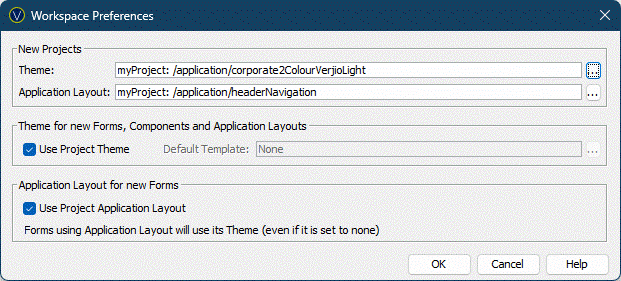
The workspace preferences are split into two sections:
New Projects
Theme: New Projects will automatically be assigned this Theme when they are created. Clicking the … displays the Workspace Browser dialog and any Theme in the Workspace can be selected. Newly created Projects will automatically be linked to the selected Theme’s Project. A Project’s Theme can be viewed and edited in its Properties.
Application Layout: New Projects will automatically be assigned this Application Layout when they are created. Clicking the … displays the Workspace Browser dialog and any Application Layout in the Workspace can be selected. Newly created Projects will automatically be linked to the selected Application Layout Project. A Project’s Application Layout can be viewed and edited in its Properties. Note that if an Application Layout is selected, The Theme will be determined by the Application Layout.
New Forms
Use Project Theme: New Forms will be set to use their owning Projects Theme. This is the recommended setting. See Form Presentation Properties for more details.
Default Template: New Forms will be set to use the selected Presentation Template. We recommend only using this setting for legacy applications that do not have a Theme. See Form Presentation Properties for more details.