Form Properties – General Properties
See also: Forms
General Properties
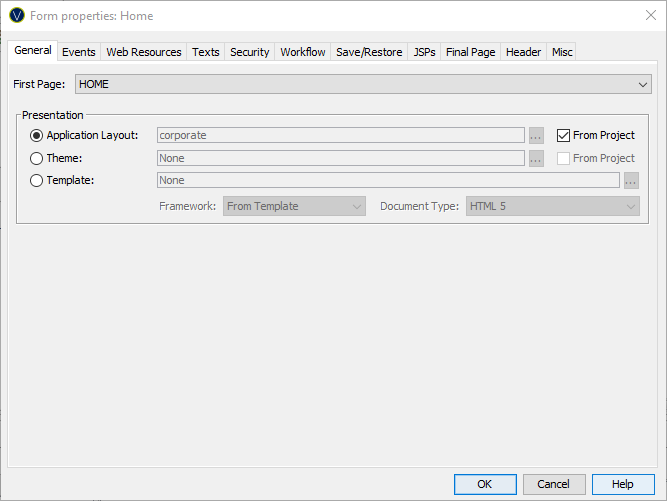
The following properties are available in the General tab of the Form Properties dialog.
|
Property |
Description |
|
First Page |
The form's first page. This is the page displayed when the form is executed. |
|
Associate this Form with a specific Application Layout. Hovering the mouse over the name will display the full path to the Application Layout. Double-clicking on the Application Layout name will open the Application Layout editor. Clicking the … displays the Workspace Browser dialog and any Application Layout in the current project or From Project can be selected. Selecting the From Project checkbox uses the Application Layout set in the Forms owning Project. If owning Project’s current Application Layout is modified or the Project is configured to use a new Application Layout, then the Application Layout in this Form is updated automatically. By selecting the Project’s Application Layout disables the Application Layout selection, Theme and Template settings. This is the default and recommended setting for new Forms. |
|
|
Associate this Form with a specific Theme. Hovering the mouse over the name will display the full path to the Theme. Double-clicking on the Theme name will open the Theme’s Presentation Template editor. Clicking the … displays the Workspace Browser dialog and any Theme in the current project or From Project can be selected. Selecting the From Project checkbox uses the Theme set in the Forms owning Project. If owning Project’s current Theme is modified or the Project is configured to use a new Theme, then the styling in this Form is updated automatically. By selecting the Project’s Theme disables the Theme, Application Layout settings and Template settings. This is the default and recommended setting for new Forms. If the Application Layout radio box is selected then the Theme will be determined from the Application Layout’s Theme setting and the Theme settings will be disabled. |
|
|
Associate this Form with a specific standalone Presentation Template. Hovering the mouse over the name will display the full path. Double clicking on the Template name will open its Presentation Template editor. Clicking the … button displays the Workspace Browser dialog and any Presentation Template in the current or linked Project can be selected. |
|
|
Framework |
This property is defined in a Theme. If a specific Presentation Template is being used, this Property can be changed. Please note that a Framework usually requires specific styling rules and overriding this property may result in unexpected styling. The name of the styling framework used by this Form or “None”. Changing this property may result in changes to the generated HTML and CSS to suit the styling framework or in changes to the list of available controls and changes to some Control properties – additional features may be displayed to suit the framework. Currently supported Frameworks:
|
|
Document Type |
This property can only be set if the Form is configured to use a Presentation Template. This sets the document type (HTML or XHTML) and the version of HTML or XHTML used:
The default for this parameter is taken from Form Options tab of Designer Preferences. |