Working with Presentation
Templates
Form
Property Defaults Section
Presentation
Templates in Themes
Selecting
a Theme’s Web Resource file
See also: Themes, Introduction to Styling, Sample applications and templates, Property Sets, Style Sheets, How CSS Style is Applied, Using SCSS Files, Pages, Controls, Layouts, Working with Web Resources
Introduction
A Presentation Template provides the ability to separate styling from the form or component to which it is applied. Styling properties can be configured in a Presentation Template which is then associated with a form, so a Presentation Template can be thought of as a “theme” or a “skin”.
While a form does not have to be linked to a Presentation Template, doing so is an excellent way of providing consistency across multiple forms and pages. Any changes made to a Presentation Template will be reflected in all the forms linked to it, as well as any pages within those forms.
A number of sample Presentation Templates are shipped with the distribution. Click here for details.
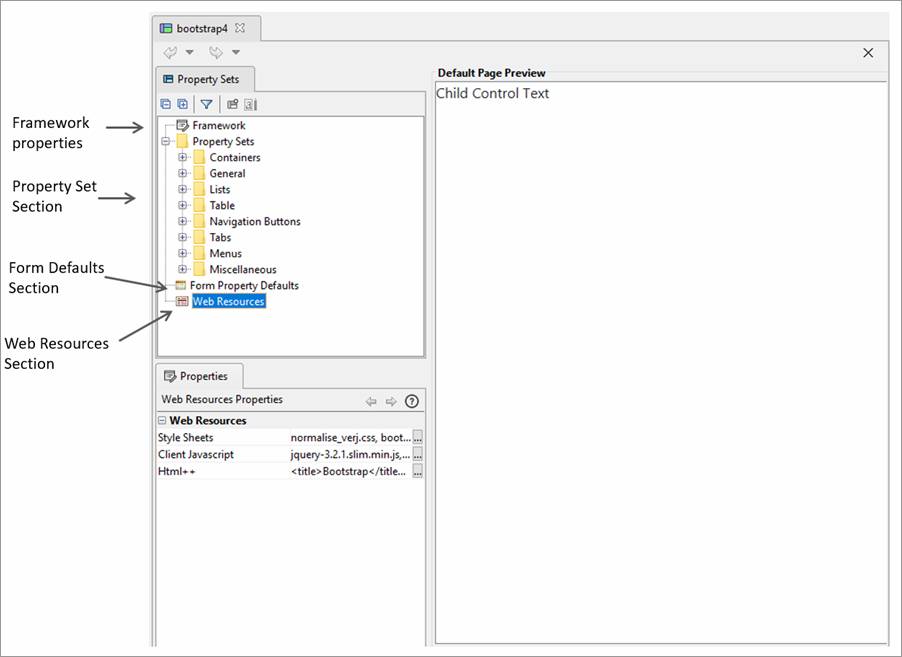
Framework Properties Section
Allows specification of the styling framework used by this template or “None” to indicate no framework. Changing this property may result in changes to the generated HTML and CSS to suit the styling framework or in changes to the list of available controls and changes to some control properties – additional features may be displayed to suit the framework. “None” means that the default HTML and CSS is generated and the default list of controls is displayed.
Currently supported frameworks:
- Bootstrap 4: generates HTML/CSS suitable for use with Bootstrap 4. When this is selected, the Html Document Type property in Form Properties is set to HTML 5 and cannot be changed.
See Using Bootstrap with Verj.io
Property Sets Section
Multiple Property Sets can be created and maintained for each type of Control. When a Form is linked to a Presentation Template, any of these Property Sets can then be applied to a control of the same type at the touch of a button. One Property Set per control type can be marked as its Default Property Set which is applied to the control as it is added to a page.
The properties available differ depending on the type of control. For example, Container Controls provide a property to set the Layout for their child Controls. Most Controls can be styled via Styling Assistants. These properties can be overridden by the Control after it has been added to a Page.
Form Property Defaults Section
For forms which are linked to the Presentation Template, this section provides the opportunity to provide default