Application Layout Properties –
Event Properties
See also: Application Layouts, Server-side Events
Event Properties
The following properties are available in the Events tab of the Application Layout Properties dialog.
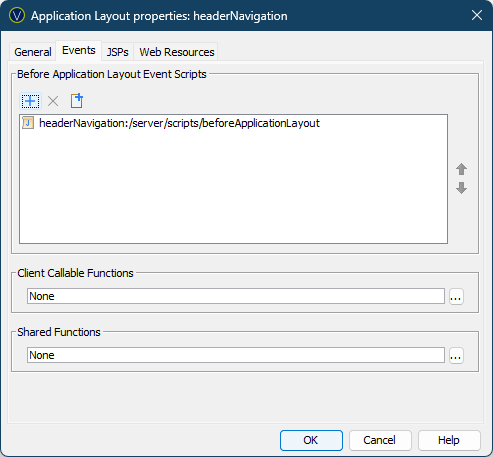
Before Application Layout Event Scripts
The Before Application Layout event runs when the Application Layout is initialised before the first Form configured to use it is served.
All scripts currently attached to this event are displayed and each script can be opened by double clicking on it. Scripts from inside the Application Layout are displayed in the following format: applicationLayoutName:/pathToScript
Scripts can be added and removed by clicking on the  and
and  buttons. The button opens the Workspace Browser allowing you to
select scripts from inside the Application Layout and scripts from its Project
and dependent Projects.
buttons. The button opens the Workspace Browser allowing you to
select scripts from inside the Application Layout and scripts from its Project
and dependent Projects.
Clicking the new icon  creates a new script. A dialog pops up where
you can specify the script name and the folder where the script should be
created. Any folder in the current Project or dependent Projects can be chosen.
creates a new script. A dialog pops up where
you can specify the script name and the folder where the script should be
created. Any folder in the current Project or dependent Projects can be chosen.
The order of the scripts denotes the sequence in which they
are executed when the event is triggered and can be altered by selecting a
script and clicking on the  and
and  icons.
Client Callable Functions
Scripts containing functions that you want to be able to call from the browser are configured here. These functions can be called using the Client API $eb.executeFunction function, for example. See Working with the Client API for more information.
Clicking the … button opens the Workspace Browser allowing you to select scripts from inside the Application Layout and scripts from its Project and dependent Projects.
Shared Functions
Scripts containing functions that all Application Layout scripts can call are configured here. See Shared Functions for more details.
Clicking the … button opens the Workspace Browser allowing you to select scripts from inside the Application Layout and scripts from its Project and dependent Projects.