Client Javascript and Rich Client Features
Locating Controls and Html elements
Associating Scripts with a Page
Finding Specific Elements to Manipulate
Html 5 Attributes and Mobile Devices
See also: Working with Web Resources, Html Element Properties, Client API Guide
Introduction
Today’s web applications are becoming increasingly interactive and display more and more features that were previously only found in dedicated programs running on the user’s machine. Examples of these rich client features are:
- Popping up dialog panels
- Displaying autocomplete lists
- Panels that dynamically open and close
- Drag and drop
- Displaying additional information in mouseover tooltip boxes
- Dropdown action menus
- Automatically updating panels at timed intervals
These features, and many more, are implemented using client-side Javascript - Javascript that executes in the browser, frequently using jQuery. In this document we discuss the building blocks supplied with the Verj.io system that you can use to create these rich client effects.
Building Blocks
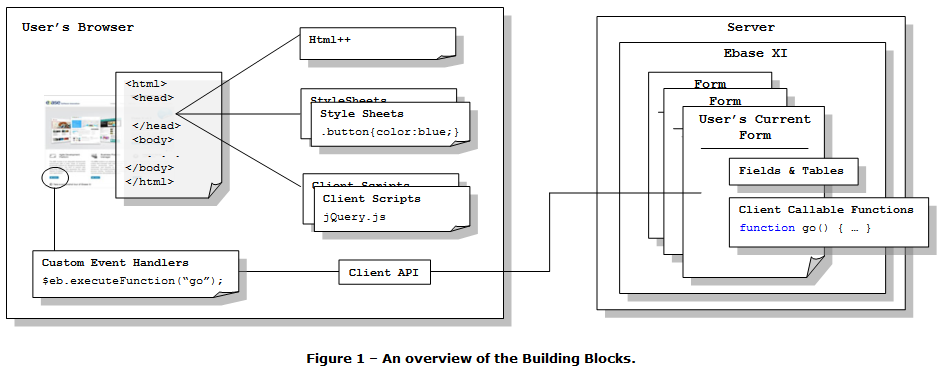
Styling the Page
Style Sheets can be attached to any page to style parts of that page. These style sheets can be either internal (created in the Verj.io Studio) or external (loaded via a URL). More details.
They are also generated by the system to apply styling configured in the Verj.io Studio using Styling Assistants. More details.
Configuring Client Javascript
There are a number of ways to create client-side Javascript and you can use these in any combination:
- Client Javascript: these are essentially Javscript script files that can be either internal (created in the Verj.io Studio) or external (loaded via a URL). These client scripts are loaded in the Head section of an Html page. More details.
- Html++: this provides an alternative way of loading Javascript into the Head section of an Html page; this is loaded inline as opposed to be being loaded via a URL. One reason you might choose to use this option as opposed to a client script is that Html++ can contain substitutable variables: this gives you the ability to create dynamic Javascript. More details.
- Custom Event Handlers: configured in HTML element Properties, they provide the ability to create Javascript snippets that are event driven e.g. an onChange or onClick event. You can choose to include all the code you need in one of these snippets or you might choose to call functions which are contained in a client script. More details.
Locating Controls and Html elements
HTML element Properties can be used to create locators – these allow you to find one control from another control e.g. you might want to find a Panel Control so you can use it to create a popup dialog when an icon is clicked. More details.
Interacting with the Server
When creating these rich client features, you frequently want to interact with the server, either to download information or to ask the server to perform some task – update a database, call a web service etc. This is achieved by using the Client API – this is a Javascript API that allows you to retrieve or update information from Fields & Tables on the server, and also allows you to invoke server-side Javascript Client Callable Functions. More details.
Client Javascript
See: Client Javascript Editor.
A Client Javascript file is a script that is destined to be executed on the browser. They can be associated with any number of pages (see Associating Scripts with a Page), so a library of functions can be developed once and then used across the web site.
Associating Scripts with a Page
See: Forms, Working with Web Resources, Client Javascript Configuration Dialog
Client Javascript files can be associated with a Page at three levels:
· In the Presentation Template – All scripts added here are automatically available to any Forms that are linked to it.