Form Properties – Text
Properties
See also: Forms, Texts<\/a>
Text Properties
The following properties are available in the Texts tab of the Form Properties dialog.
Paths to linked Texts files
Here you can configure any number of Texts entity files.
Once configured, the texts in these files can be used for any purpose e.g.
displaying a text, issuing a message etc. These texts entity files can be
thought of as shared texts in that
they are free-standing files that can be shared among any number of forms.
These texts files are in addition to
the local texts which are private
texts within each form (click on the maintain texts icon  on the toolbar
within the form editor to edit these local texts). See Texts<\/a> for more info on how to
configure texts and what you can do with them.
on the toolbar
within the form editor to edit these local texts). See Texts<\/a> for more info on how to
configure texts and what you can do with them.
Both the local texts and these configured texts files consist of a number of individual texts which are identified by an id. At runtime the system searches for a text using its id, and searches first the local texts followed by all configured texts files in the order shown.
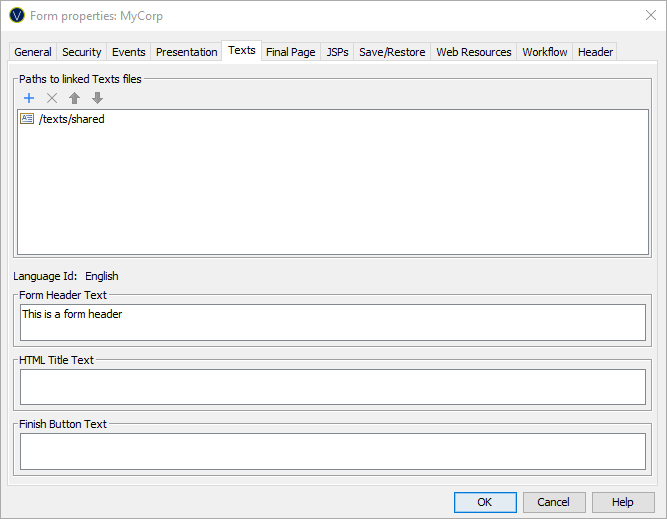
Click the  icon to add a Texts entity. This displays the
Workspace Browser dialog which displays all available texts files in the
current
icon to add a Texts entity. This displays the
Workspace Browser dialog which displays all available texts files in the
current
Click the  icon to remove Texts entities.
Click the up/down icons to reorder the Texts entities.
Configure form level texts
To view and maintain all language texts in the same window you can click the Maintain language texts button on the form toolbar. Single texts can also be changed by double clicking on the text in the WYSIWYG view.
|
Property |
Description |
|
Form heading text |
The language-dependent form header text displayed at the top of each page. |
|
HTML title text |
The language-dependent text displayed in the browser title bar. This text should always be supplied to make the form accessible to disabled groups. (See Designing for Accessibility) |
|
Finish button text |
The language-dependent text displayed on the finish button |