Application Layout Properties –
JSP Properties
See also: Application Layouts, Surrounding JSPs
JSP Properties
The following properties are available in the JSPs tab of the Application Layout Properties dialog.
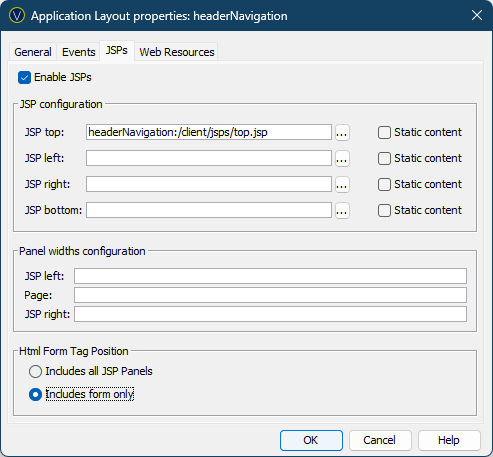
JSPs from inside the Application Layout are displayed in the following format: applicationLayoutName:/pathToJSP
|
Property |
Description |
|
Enable JSPs |
If you wish to surround your application with additional panels, you can do so by enabling JSPs and specifying their paths here. See Surrounding JSPs for more information. |
|
Top JSP |
The URL of the top JSP. Clicking the … button opens the Web Resource Browser. |
|
Left JSP |
The URL of the left JSP. Clicking the … button opens the Web Resource Browser. |
|
Right JSP |
The URL of the right JSP. Clicking the … button opens the Web Resource Browser. |
|
Bottom JSP |
The URL of the bottom JSP. Clicking the … button opens the Web Resource Browser. |
|
Static content |
This checkbox applies only when Ajax communication is enabled. When checked, the JSP is not refreshed when a page is updated, for example as a result of button click event. JSPs are always refreshed when moving to a different page. |
|
Panel widths configuration |
|
|
JSP left |
The width of the left JSP. |
|
Page |
The width of the page. |
|
JSP right |
The width of the right JSP. |
|
HTML Form Tag Position |
|
|
HTML Form Tag
Position |
Specifies the position of the HTML <form> tag. Options are: · Includes all JSP Panels - the <form> tag includes the page and all included JSP panels.
|