Form Properties – Final Page
Properties
See also: Forms, Page Sequencing
Final Page Properties
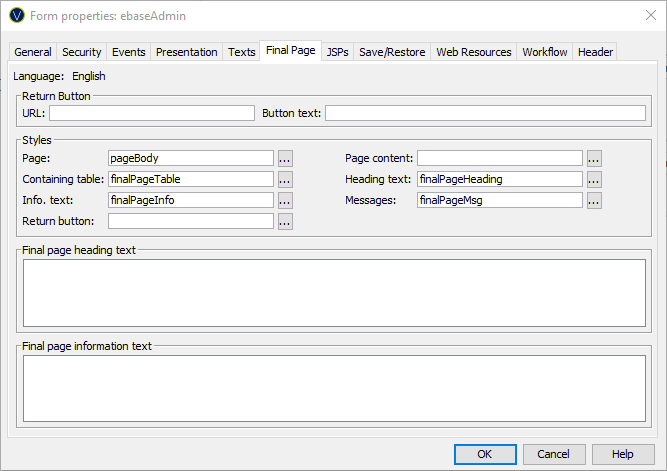
The following properties are available in the Final Page tab of the Form Properties dialog.
It is possible to set default values for many of these form properties in the presentation template associated with a form. The default properties are configured in the Form section under Property Sets within the Presentation Template Editor.
Final page tab
This allows you to set attributes for the form’s final page This is a legacy feature of the Ebase system and is not commonly used with new applications - this special page is displayed when the user clicks the special Finish button and form processing has ended (click here for further details).
|
Property |
Description |
|
Return Button URL |
Specifies the URL that will be linked to when the user presses the return button. |
|
Return Button text |
The language-dependent text to be displayed on the return button. |
|
Page style |
The CSS class and style applied to the BODY tag of the final page. Style configured here is applied to the entire page contents including surrounding JSPs. |
|
Page content style |
The CSS class and style applied to the page content. Style configured here is applied to all content excluding the surrounding JSPs. |
|
Containing table
style |
The CSS class and style applied to the TABLE tag of the final page. All content of the final page is included in this table excluding the surrounding JSPs.. |
|
Heading text style |
The CSS class and style applied to the final page heading text. |
|
Info text style |
The CSS class and style applied to the final page information text. |
|
Messages style |
The CSS class and style applied to any final messages. |
|
Return button
style |
The CSS class and style applied to the return button. |
|
Final page heading text |
The language-dependent text to be displayed at the top of the final page. |
|
Final page
information text |
The language-dependent text to be displayed below the final page heading text on the final page. |
To view and maintain all texts in the same window you can click the Maintain language texts button on the form toolbar.