Application Layout Editor
See also: Application Layouts
The Application Layout editor consists of a number of panels and views:
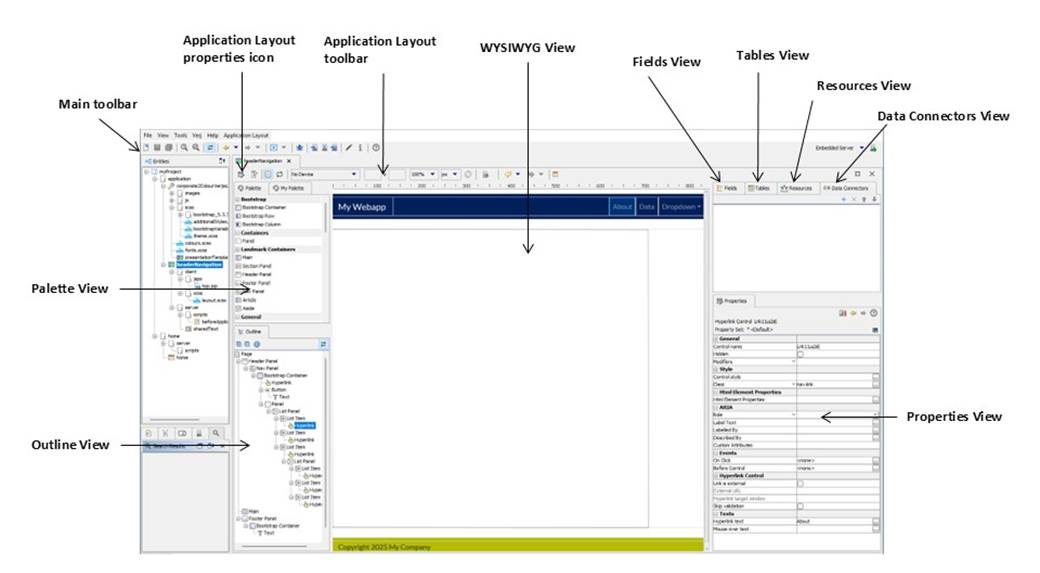
Click on the links below for details of each area.
- The Application Layout Toolbar provides a number of Application Layout level functions.
- The Application Layout Properties displays Application Layout level properties
- The WYSIWYG View is the central view panel and shows the Application Layout as it will appear in a browser.
- The Outline View is a hierarchical view of all Controls on the Application Layout. Effectively, it is an alternative view to the WYSIWYG view.
- The Palette View lists available Controls. These can be dragged to the WYSIWYG or Outline views.
- The Fields View lists all Fields in the Application Layout.
- The Tables View lists all Tables in the Application Layout.
- The Resources View lists all Resources used by the Application Layout.
- The Properties View lists the properties of the last selected element (Control, Field, Table, Page etc.).
- The Data Connectors View lists all the Data Connectors used by the Application Layout.